
Configure a MikroTik router for hotspot in 30 seconds
No technical skills required
Watch Flash in action
Screenshots
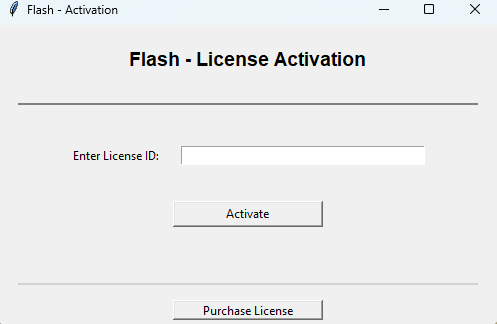
Activation
Simple and intuitive interface
30-second configuration
No technical skills needed. Our software automatically configures your MikroTik router for your hotspot.
Priority technical support
If you have any issues, our technical team is here to help you quickly.
1 free month of Dighiconnect
Enjoy 1 month of free access to our hotspot management platform after purchase.
Simple and intuitive interface
A step-by-step wizard guides you through configuring your MikroTik router.
Prices, commissions and percentages shown are indicative only and are not contractual or binding. They may change at any time, depending in particular on payment processor fees, regulations or exchange rates.
Having trouble paying?
Contact us on WhatsApp: +229 01 54 76 33 17
What you get
- A license to use the software on one computer, valid for 1 year
- Priority technical support in case of problems
- 1 month free access to our hotspot management platform
Compatibility
Windows only
Compatible with all new generation MikroTik routers sold with RouterOS version 7 or higher factory-installed.
Download the version suited to your computer
*Optimization issues may occur with the 32-bit version
How to activate your license
Download
Install Flash software on your Windows PC
Purchase
Receive your license key by email
Activate
Enter your key in the software and get started
Frequently Asked Questions
What is Flash?
Flash is a Windows software that automatically configures your MikroTik router to create a professional hotspot in 30 seconds, with no technical skills required.
How does license activation work?
After purchase, you'll receive a license key by email. Download the software, install it, then enter your key to activate. A video tutorial guides you step by step.
Does Flash handle AP antenna configuration?
No, Flash only configures MikroTik routers. For AP antenna configuration, contact us on WhatsApp and we'll help you. It's generally simple to set up.
Does Flash handle ticket/voucher generation afterwards?
No, but our Dighiconnect platform can! By purchasing this Flash license, you get 1 free month on Dighiconnect to test the platform. It simplifies professional hotspot management, online voucher sales, and much more. If you need help, contact us.
How many computers can I use my license on?
Each license is valid for one computer for 1 year. If you need to use the software on multiple computers, contact us.
Which Windows version should I choose?
If your computer was purchased after 2015, choose the 64-bit version. For older computers, use the 32-bit version. If in doubt, download the 64-bit version first.
What happens after 1 year?
Your router will continue to work normally. To reconfigure another router or use new features, you'll need to renew your license.
Does the software work on Mac or Linux?
Currently, Flash is only available for Windows. A Mac/Linux version is in development.
Which MikroTik routers are compatible?
Flash is compatible with all new generation MikroTik routers sold with RouterOS version 7 or higher factory-installed. This includes the vast majority of recent models available on the market.
Ready to simplify your life?
Configure your MikroTik router in 30 seconds and start managing your hotspot like a pro.
Need help? Contact us on WhatsApp